XSL-FO Tutorials - Herong's Tutorial Examples - v2.25, by Herong Yang
"block" Formatting Object Examples
This section provides a tutorial example on how to use 'block' formatting object with some basic attributes.
In my first example of "block" formatting objects, block-Formatting-Objects.fo, I am showing two "block" elements with some basic attributes:
<?xml version="1.1" encoding="utf-8"?>
<!-- block-Formatting-Objects.fo
 - Copyright (c) 2006 HerongYang.com. All Rights Reserved.
-->
<fo:root xmlns:fo="http://www.w3.org/1999/XSL/Format">
 <fo:layout-master-set>
  <fo:simple-page-master master-name="page"
   margin="0.1in" page-height="2in" page-width="3in">
   <fo:region-body region-name="body" background-color="#eeeeee"/>
  </fo:simple-page-master>
 </fo:layout-master-set>
 <fo:page-sequence master-reference="page">
  <fo:flow flow-name="body">
   <fo:block margin="0.1in" padding="0.2in"
    border-width="1px" border-style="solid"
    background-color="#eeffff" color="#000000"
    text-align="justify" font-family="sans-serif">
    There was once upon a time a pig who lived with her three children
    on a large, comfortable, old-fashioned farmyard.
   </fo:block>
   <fo:block border-width="1px" border-style="solid">
   </fo:block>
  </fo:flow>
 </fo:page-sequence>
</fo:root>
When you process the above sample XSL-FO document to a PDF file and open it, you should see a page with 2 block areas:
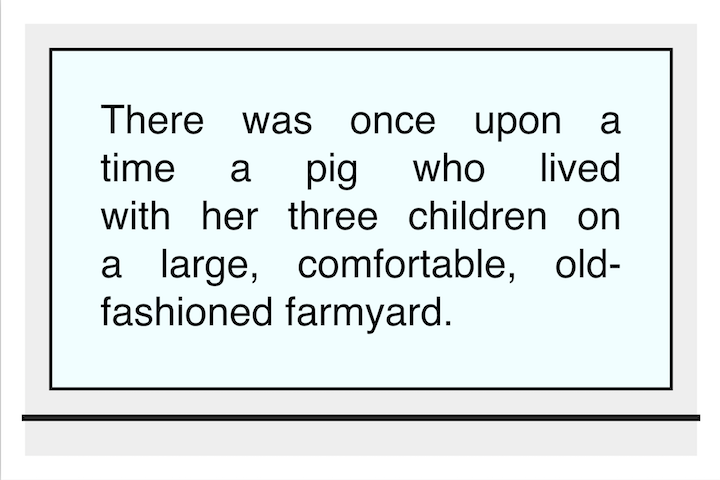
Note that:
- The white frame in the picture represents the layout margin.
- The black line near the bottom represents the block area generated from the second "block" formatting object, It has a border only with no content area.
- Everything above the black line represents the block area generated from the first "block" formatting object, It has a gray frame as its margin, a black frame as its border, and a light rectangle as its content area.
Table of Contents
Apache™ FOP (Formatting Objects Processor)
XSL-FO Document Basics and Examples
►Block-Level Formatting Objects
What Are Block-Level Formatting Objects
What Is "block" Formatting Object?
►"block" Formatting Object Examples
Margin Collapsed between Block Areas
space-before/space-after vs. Margin
Block Splitting for Page Break
Controlling White Space Characters
What Is "block-container" Formatting Object?
Inline-Level Formatting Objects
Including Graphics in XSL-FO document
Floating Blocks - "float" and "footnote"
Hyperlinks, Table of Contents and Indexes
Headers and Footers using "static-content"
Font Attributes and Font Families
Apache FOP Font Configurations