Ubuntu Tutorials - Herong's Tutorial Examples - v1.25, by Herong Yang
GNOME Application - Image Viewers
This section introduces 3 basic image/picture viewers for GNOME desktop. gThumb seems to be a nice image browser with enough basic editing functions.
When you double-click on a picture or image file, it will be open by a default GNOME application called "Image Viewer".
"Image Viewer" offers 4 action buttons on the image display window:
- Left Arrow - On the left edge to open the previous image in the same directory.
- Right Arrow - On the right edge to open the next image in the same directory.
- Left Rotate - On the left of the bottom edge to rotate the image 90 degrees to the left.
- Right Rotate - On the right of the bottom edge to rotate the image 90 degrees to the right.
If you want to more image-editing features, you can right-click on the image file and select "Shotwell" to open the image.
"Shotwell" offers editing features like:
- Navigation - Open previous or next image in the same directory.
- Rotation - Rotate image 90 degrees.
- Crop - Crop image to the selected area.
- Straighten - Rotate the image slightly to straighten horizontal lines in the images.
- Date and time - Update date and time information embedded in the image (picture).
If "Shotwell" is not available on your computer, you can install it by the "sudo apt install shotwell" command.
For more advanced editing features, you can try "gThumb", which offers you the following features:
- Navigation - Open previous or next image in the same directory.
- Rotation - Rotate image 90 degrees, or at any angle.
- Crop - Crop image to the selected area.
- Transformation - Apply different transformation to adjust image colors.
- Resize - Change image size by modify its pixels in horizontal and vertical directions.
- Conversion - Save the image in different file formats.
- Date and time - Update date and time information embedded in the image (picture).
- Tag and Comment - Add tags and comments to the image.
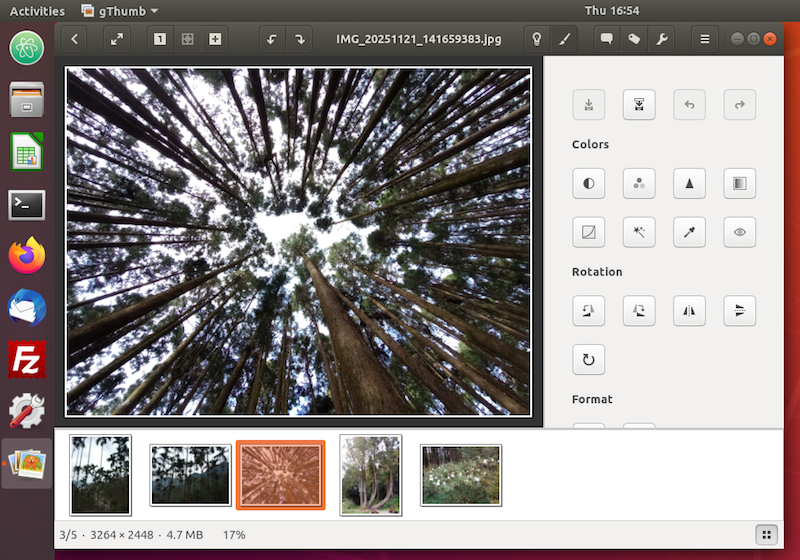
Table of Contents
Introduction to Ubuntu Systems
►GNOME - Desktop Interface and Environment
gnome-tweaks - The GNOME Tweak Tool
►GNOME Application - Image Viewers
GNOME Application - Video Players
Shell - The Command-Line Interpreter