PKI Tutorials - Herong's Tutorial Examples - v2.34, by Herong Yang
Exporting Server Certificate to File in Google Chrome
This section provides a tutorial example on how to export an HTTPS server certificate to a certificate file in PEM (Privacy Enhanced Mail) format, also called Base-64 encoded X.509 format.
In previous tutorials, I learned how to view an HTTPS server certificate and its certificate chain. Now I want to learn how to save a server certificate to a certificate file.
1. Run Google Chrome and go to https://www.yahoo.com. Wait for the home page to be fully loaded.
2. Click the site information icon at the left side of the URL address area. I see the site information popup box.
3. Click "Connection is secure". I see the site security popup box.
4. Click the "Certificate is valid" link on the popup box. I see the server certificate displayed in the Certificate Viewer.
5. Since different Chrome releases may use different Certificate Viewers, you may have to navigate differently to export the server certificate. For example:
- Click the "Export" button on the "Details" tab on Chrome 124,
- Select the certificate icon and drag it to a folder on Chrome 103.
- Click the "Copy to file" button on the "Details" tab on Chrome 40.

6. If the "Certificate Export Wizard" is showing up during the exporting process, you may see options for the certificate file format:
Certificate can be exported in a variety of file formats.

Select the format you want to use:
   ( ) DER encoded binary X.509 (.CER)
   (.) Base-64 encoded X.509 (.CER)
   ( ) Cryptographic Message Syntax Standard
       - PKCS #7 Certificates (.P7B)
   ...
7. Select "Base-64 encoded X.509 (.CER)", which is also called the PEM format. This is the safest format for a certificate file.
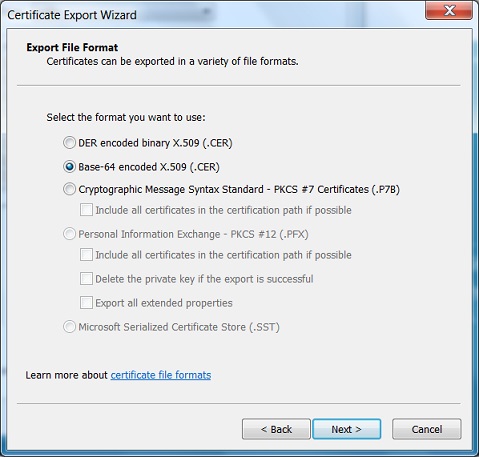
Table of Contents
Introduction of PKI (Public Key Infrastructure)
Introduction of HTTPS (Hypertext Transfer Protocol Secure)
►Using HTTPS with Google Chrome
Visiting "HTTPS" Website with Google Chrome
Viewing Server Certificate in Google Chrome
Viewing Server Certificate Chain in Google Chrome
►Exporting Server Certificate to File in Google Chrome
Viewing Trusted Root CA Certificates in Google Chrome
Listing of Trusted Root CA in Google Chrome
Exporting Root Certificate to File from Google Chrome
Deleting Root CA Certificates from Google Chrome
Google Chrome Shares Windows PKI with IE
Using HTTPS with Mozilla Firefox
Using HTTPS with Microsoft Edge
Using HTTPS with IE (Internet Explorer)
Android and Server Certificate
Windows Certificate Stores and Console
RDP (Remote Desktop Protocol) and Server Certificate
macOS Certificate Stores and Keychain Access
Linux Certificate Stores and Tools
Perl Scripts Communicating with HTTPS Servers
PHP Scripts Communicating with HTTPS Servers
Python Scripts Communicating with HTTPS Servers
Java Programs Communicating with HTTPS Servers
.NET Programs Communicating with HTTPS Servers
CAcert.org - Root CA Offering Free Certificates
PKI CA Administration - Issuing Certificates
Comodo Free Personal Certificate
Digital Signature - Microsoft Word
Digital Signature - OpenOffice.org 3