Ethereum Tutorials - Herong's Tutorial Examples - v1.06, by Herong Yang
Download Ethereum Mist for Windows
This section describes how to download Ethereum Mist for Windows.
Ethereum Mist is a Standalone Full-Node Wallet for Windows computers. It stores the digital credentials for your Ethereum account and allows you to receive and send Ethereum funds. It also maintains a complete set of Ethereum blockchain data locally and runs as a node on the Ethereum network.
Here is what I did to install Ethereum Mist on my Windows computer:
Go to https://github.com/ethereum/mist/releases.
Click "Ethereum-Wallet-win32-0-9-3.zip" to download Ethereum Mist.
Save the download file as \herong\Ethereum-Wallet-win32-0-9-3.zip
Unzip it to \herong\win-ia32-unpacked\
Below is the "Ethereum Mist for Windows" download Website:
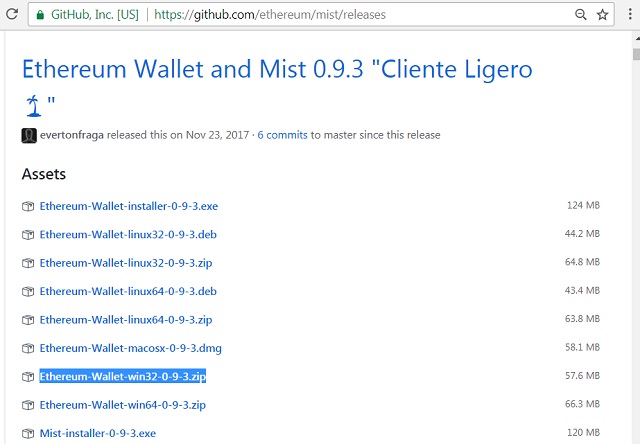
Table of Contents
►Download Ethereum Mist for Windows
Run Ethereum Mist Wallet for Windows
Ethereum Mist Wallet Data File Location
Ethereum Mist Wallet Command Options
Deprecated: Testnet - Ropsten Network
64-Bit "geth" for Private Ethereum Network
Private Network with Custom Genesis Block
Transferring Funds between Ether Accounts
MetaMask - Browser Based Ethereum Wallet
Getting Free Ether on Test Networks