PKI Tutorials - Herong's Tutorial Examples - v2.34, by Herong Yang
Mozilla Firefox Displaying Certificate Error Page
This section provides a tutorial example showing that Mozilla Firefox fails to validate an HTTPS server certificate and displays a certificate error page.
Now I want to see how Mozilla Firefox behaves after I deleted the root certificate "VeriSign Class 3 Public Primary Certification Authority - G5".
1. Open Mozilla Firefox to visit "https://login.yahoo.com".
2. Mozilla Firefox returns with an untrusted connection error page:
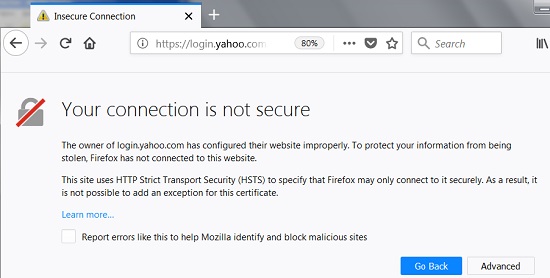
3. Read the error message:
This Connection is not secure

The owner of login.yahoo.com has configured their website improperly. To
protect your information from being stolen, Firefox has not connected to
this website.

This site uses HTTP Strict Transport Security (HSTS) to specify that
Firefox may only connect to it securely. As a result, it is not possible
to add an exception for this certificate.
Mozilla Firefox fails to validate "login.yahoo.com" certificate as expected, because the root CA "VeriSign Class 3 Public Primary Certification Authority - G5" certificate has been deleted from Firefox.
If you are using an older version, the error message may read differently as shown below:
This Connection is Untrusted

You have asked Firefox to connect securely to login.yahoo.com, but we
can't confirm that your connection is secure.

Normally, when you try to connect securely, sites will present trusted
identification to prove that you are going to the right place.
However, this site's identity can't be verified.

What Should I Do?

If you usually connect to this site without problems, this error could
mean that someone is trying to impersonate the site, and you shouldn't
continue.

Get me out of here!

Technical Details

I Understand the Risks

See next tutorials on how install the root CA back, or add an security exception to continue using the Website.
Table of Contents
Introduction of PKI (Public Key Infrastructure)
Introduction of HTTPS (Hypertext Transfer Protocol Secure)
Using HTTPS with Google Chrome
►Using HTTPS with Mozilla Firefox
Visiting "https" Website with Mozilla Firefox
Viewing Server Certificate in Mozilla Firefox
Server Certificate General Information
Viewing Server Certificate Chain in Mozilla Firefox
Exporting Server Certificate to File in Mozilla Firefox
Viewing Pre-Installed Certificates in Mozilla Firefox
Listing of Trusted Root CA in Mozilla Firefox
Exporting Root Certificate to File from Mozilla Firefox
Deleting Root CA Certificates from Mozilla Firefox
►Mozilla Firefox Displaying Certificate Error Page
Adding Security Exception in Mozilla Firefox
Failing to Import Root CA Certificates to Mozilla Firefox
Certificate Trust Settings in Mozilla Firefox
Using HTTPS with Microsoft Edge
Using HTTPS with IE (Internet Explorer)
Android and Server Certificate
Windows Certificate Stores and Console
RDP (Remote Desktop Protocol) and Server Certificate
macOS Certificate Stores and Keychain Access
Linux Certificate Stores and Tools
Perl Scripts Communicating with HTTPS Servers
PHP Scripts Communicating with HTTPS Servers
Python Scripts Communicating with HTTPS Servers
Java Programs Communicating with HTTPS Servers
.NET Programs Communicating with HTTPS Servers
CAcert.org - Root CA Offering Free Certificates
PKI CA Administration - Issuing Certificates
Comodo Free Personal Certificate
Digital Signature - Microsoft Word
Digital Signature - OpenOffice.org 3