Windows Security Tutorials - Herong's Tutorial Examples - v3.01, by Dr. Herong Yang
Disabling Accelerators in IE
This section provides a tutorial example on how to review and disable accelerator in IE (Internet Explorer).
The third group of IE (Internet Explorer) add-ons is called "Accelerators", which allows you use Web service on selected word on any Web page. For example, you can highlight a word on a website, right-click, and select the "Translate with Bing" accelerator to obtain a translation of a word without having to go to a separate website.
You should review and disable unwanted accelerators.
1. Run IE and click "Tools > Manage add-ons" menu.
2. Click the "Accelerators" icon on the left. You will see a list of accelerators currently used in IE.
For example, I have the following accelerators in my IE:
E-mail with Windows live - Disabled
Find product with eBay - Enabled
Map with Bing - Disabled
Map with Yahoo! - Enabled
Translate with Bing - Disabled
Search Youtube - Enabled
3. Select "Find product with eBay" and click "Disable". I don't think I need this accelerator.
4. Disable all other accelerators.
My recommendation is that you should enable an accelerator if it has a 5 out 5 rating and good reviews, and you absolutely need it.
The picture below shows some accelerators in IE:
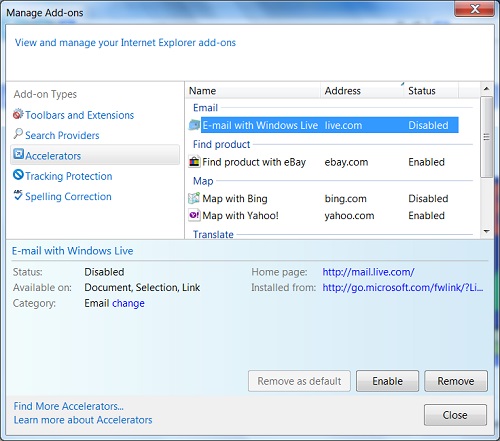
Table of Contents
About This Windows Security Book
Windows 8: System Security Review
Windows 8: System Security Protection
Windows 8 Defender for Real-Time Protection
Windows 7: System Security Review
Windows 7: System Security Protection
Windows 7 Forefront Client Security
Norton Power Eraser - Anti-Virus Scan Tool
McAfee Virus and Malware Protection Tools
Spybot - Spyware Blocker, Detection and Removal
►Keeping IE (Internet Explorer) Secure
Keeping IE (Internet Explorer) Up To Date
Home Page and History Options for IE
Setting Security Level to Medium-High in IE
Setting Privacy Level to Medium High in IE
Disabling Form Auto-Completion in IE
Disabling Extension Add-Ons in IE
Disabling Search Engines in IE
Adding Tracking Protection List in IE
Building Tracking Protection List in IE
Malware (Adware, Spyware, Trojan, Worm, and Virus)
HijackThis - Browser Hijacker Diagnosis Tool
IE Add-on Program Listing and Removal
"Conduit Search" - Malware Detection and Removal
"Tube Dimmer", "Scorpion Saver" or "Adpeak" Malware
Malware Manual Removal Experience
Vundo (VirtuMonde/VirtuMundo) - vtsts.dll Removal
Trojan and Malware "Puper" Description and Removal
VSToolbar (VSAdd-in.dll) - Description and Removal
PWS (Password Stealer) Trojan Infection Removal