Chinese Web Sites Using PHP - v2.24, by Herong Yang
Processing Web Form Input in ASCII
This section describes how to display a Web form and process form input data in ASCII.
To show you how Web form input data can be processed with a PHP script, I wrote this short test script to display a simple Web form, and process the input in one script:
<?php
#- Web-Form-Input-ASCII.php
#- Copyright (c) 2005 HerongYang.com. All Rights Reserved.
#
  print('<html>');
  print('<body>'."\n");

# Default input text
  $input = "Television";

# Form reply determination
  $reply = isset($_REQUEST["Submit"]);

# Process form input data
  if ($reply) {
    if (isset($_REQUEST["Input"])) {
      $input = $_REQUEST["Input"];
    }
  }

# Display form
  print('<form>');
  print('<input type="Text" size="40" maxlength="64"'
   . ' name="Input" value="'.$input.'"/><br/>');
  print('<input type="Submit" name="Submit" value="Submit"/>');
  print('</form>'."\n");

# Display reply
  if ($reply) {
    print('<pre>'."\n");
    print('You have submitted:'."\n");
    print('  Text = '.$input."\n");
    print('</pre>'."\n");
  }

  print('</body></html>');
?>
After moving this PHP script file to Apache server document directory, I tested it with Internet Explorer (IE) with this URL: http://localhost/Web-Form-Input-ASCII.php. I saw a Web page with a form that has the suggested input value and a submit button.
After clicking the submit button, I saw a returning Web page with the same form and a reply section, which confirmed that the input text were correctly received by the PHP script.
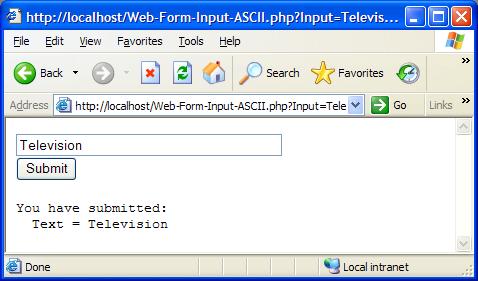
Table of Contents
PHP Installation on Windows Systems
Integrating PHP with Apache Web Server
charset="*" - Encodings on Chinese Web Pages
Chinese Characters in PHP String Literals
Multibyte String Functions in UTF-8 Encoding
►Input Text Data from Web Forms
►Processing Web Form Input in ASCII
Processing Web Form Input in Latin1 Encoding Error
Processing Web Form Input in Latin1
Entering Latin1 Characters with Alt Keycodes
Testing Latin1 Alt Keycodes with IE
Processing Web Form Input in UTF-8
Outputting Form Default Input Text in UTF-8
Testing Alt Keycodes with IE on a UTF-8 Web Page
Input Chinese Text Data from Web Forms
MySQL - Installation on Windows
MySQL - Connecting PHP to Database
MySQL - Character Set and Encoding
MySQL - Sending Non-ASCII Text to MySQL
Retrieving Chinese Text from Database to Web Pages
Input Chinese Text Data to MySQL Database